
Local execution
Overview
Local execution moves a task's commands from the server to the user's computer. Your server still keeps the conversation and task state, calls the chosen model, and accounts for usage. The worker's private Run API coordinates execution on the desktop.
It is disabled by default. Installing the desktop app or enabling its local setting does not enable the server feature. Where workspace files live is a separate choice.
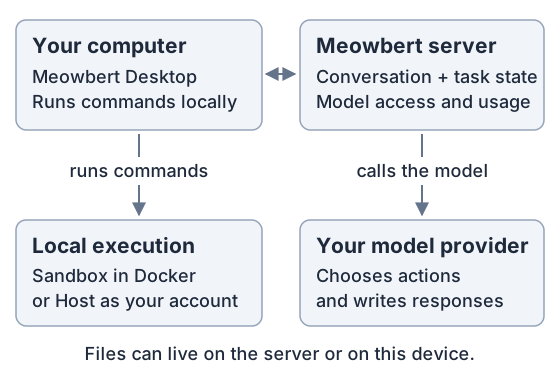
There are two storage arrangements:
| Workspace | Operator setup |
|---|---|
| Server-hosted | Enable the server feature and give the desktop access to the existing backend root, through a local folder or SMB/NFS share |
| Device-hosted | Enable the server feature; the desktop creates and owns its workspace folder, without a server-storage share |
The setup below is for server operators. Desktop users can start with Local tasks.
Server JSON configuration
Merge these top-level entries into the configuration used by both the API and worker. For the standard single-worker Docker Compose setup, that is config/global.docker.json:
{
  "localExecution": {
    "enabled": true
  },
  "runApi": {
    "port": 4100,
    "url": "http://worker:4100",
    "executorTransport": "direct"
  }
}
This is a partial configuration: keep the other settings in your file. Update existing entries rather than adding duplicate JSON keys. Outside Docker, the usual file is config/global.json; MEOWBERT_CONFIG_PATH overrides the location for either service.
| Setting | Meaning |
|---|---|
localExecution.enabled | Enables local execution on the server. Both this setting and runApi are required. |
runApi.port | The worker's internal listener port. 4100 is an example, not a built-in default. |
runApi.url | The address the API uses to reach this worker. worker is the Compose service name in this example. |
runApi.executorTransport | direct keeps cloud tasks using their normal in-process execution. http also routes cloud tasks through the Run API; it is not required for local tasks. |
The desktop continues to connect to your normal public API address. The API forwards each run's calls to the worker holding its lease. Keep the worker listener on the internal network; there is no need to publish port 4100 or give its URL to desktop users.
If API and worker run directly on the same host, use an address such as http://127.0.0.1:4100 instead. On separate hosts, use the worker's private hostname or address. A loopback URL inside the API container points to that container, not the worker. With multiple workers, each worker must advertise its own API-reachable listener rather than a shared address that can route a request to a different worker.
Use current server and desktop versions together, with the server's database migrations applied. Updating the desktop app does not update the server.
Server-hosted workspace storage
Choosing Local changes where commands run; it does not move the workspace. A local task in an existing server-hosted workspace needs access to the same files as the server. Meowbert does not automatically copy or synchronize a server workspace onto the user's computer.
- Server and desktop on the same machine: choose the backend's actual host folder in the desktop settings. For a containerized server, use the host side of the bind mount, not the container path.
- Server on another machine: export the backend root over SMB or NFS, then have the user mount that share on their computer. Meowbert does not create the share or mount it for them.
The backend root is storage.backends[].mountPath for a mounted backend, or the parent of storage.backends[].workspacesRoot for a local backend. It must contain the server-written .meowbert-storage.json marker. Share that root, not an individual workspace, Project or task subfolder. An empty local folder or a copied marker is not a substitute for access to the same storage.
For example, an existing mounted backend might have these paths:
| Location | Example |
|---|---|
| Backend ID in the server configuration | shared-main |
| Backend root inside API and worker containers | /app/runtime/storage/shared-main |
| Corresponding folder on the server host | /srv/meowbert/runtime/storage/shared-main |
| The same root mounted on a Mac | /Volumes/Meowbert |
| Desktop Storage backend ID | shared-main |
| Desktop Storage root | /Volumes/Meowbert |
The paths can differ across machines; the underlying files and backend identity must match. Give users the backend ID for their existing workspace, not just the default for new workspaces. In the desktop app, they enter that ID and choose the mounted folder under Desktop Preferences → Local Execution. They can then select Local · their computer's name when creating a task in the existing Project. See the desktop walkthrough.
The mount needs read/write access. Sandbox mode also requires Docker Desktop to share it into its Linux VM. Host mode does not need Docker, but still needs the same server storage. UID mapping, NFS squash rules, SMB permissions and Docker file sharing belong to the host/share setup. Meowbert checks storage identity and access before admitting tasks; unavailable storage leaves them waiting.
Anyone who can mount a backend can read that backend. Use separate backends per tenant on multi-tenant installations. Independent mounts of the same remote service, such as Google Drive for desktop alongside server rclone, remain unsupported because their caches can disagree. See Storage Backends for backend configuration.
Device-hosted workspaces
The desktop app's On this device workspace option stores files in a folder chosen by the user and needs no shared server mount. Server-side local execution still needs to be enabled. All tasks and recurring runs in that workspace target its owning device; this option creates a separate workspace rather than converting an existing server-hosted one.
Files stay on the device, but file content read by the agent is sent to the model through the server. Conversations, settings and usage remain server-managed. Device workspaces are single-user and omit server-only file features. Deleting a workspace preserves its chosen folder. See Workspaces on this device for the user-facing behavior.
Sandbox and host requirements
Local executors support Apple Silicon macOS and Windows x64/arm64. The universal macOS app can also connect to the server on Intel Macs, but local task execution is not supported there.
- Sandbox: requires Docker Desktop with Linux containers and a sandbox image the device can pull. Use the published image with a multi-architecture manifest digest:
linux/amd64for Windows x64 and cloud workers, andlinux/arm64for Apple Silicon and Windows arm64 devices. A server-only image tag is not enough for a remote device. The app asks before the initial sandbox download. - Host: runs directly as the desktop user, without Docker. Host mode and Host shell require explicit device consent and can access any file or command available to that user. Host mode uses only host-supported bundled skills; it does not install missing runtime tools.
The Windows default Docker transport is npipe:////./pipe/dockerDesktopLinuxEngine; DOCKER_HOST can select a different local pipe. Computer Use and Your Chrome are separate desktop opt-ins. Keep host execution disabled on untrusted shared machines.
The official runtime image is ghcr.io/xinthedark/meowbert-sandbox-runtime:main. Every runtime publication also updates ghcr.io/xinthedark/meowbert-ai-agent/sandbox-runtime:main with the same multi-architecture build. The standard and generated Compose files and example configurations default to the original image name. MEOWBERT_SANDBOX_RUNTIME_IMAGE overrides the image for the API, worker, and runtime service together; the explicit local-sandbox Compose override builds meowbert-sandbox-runtime:local instead.
Desktop installers do not bundle or choose a separate runtime image. The worker records its configured image repository and digest at startup, the API advertises that pair, and the desktop pulls the exact digest for its architecture. When Compose updates the runtime service, its restart dependency also restarts the worker to refresh that recorded digest.
If a device reports no matching manifest for linux/arm64, the server-selected image digest does not include that platform. Pull the updated configured runtime image on the server and restart the worker so it records the new digest. Existing deployments can keep the original repository name. Publishing a new main tag does not change an already-recorded digest. Host mode can remain available while the sandbox image is unavailable.
Model requests use the server's configured providers and usage limits. Provider API keys and GitHub App signing keys stay on the server. Local execution does not provide an offline model.
Brief model connection losses reconnect to the original request rather than starting another provider call. The worker allows five seconds to reconnect after provider work starts and retains completed results for retries. Cancellation and lease loss still stop active work. If the original result cannot be recovered, the task reports an unknown outcome instead of repeating the request. Connection failures do not remove conversation history.
Update the API, worker and desktop app together to enable model request recovery. This recovery change uses the existing operation table and needs no additional database migration.
Live Google Drive folders are a separate macOS feature for both Sandbox and Host mode, not a replacement for sharing a server-hosted workspace backend. They use the desktop app's bundled rclone and the built-in NFS client, without macFUSE. Sandbox mode binds only the attached folders into Docker Desktop and verifies file visibility and write access before execution. Windows does not support these mounts. After connection-specific consent, the device receives a credential with access to the connected user's entire Drive; choosing a folder does not narrow that credential. Disconnecting Drive revokes its refresh token at Google. See Live Google Drive folders for consent and revocation details.
Device notifications and updates
Apply database migrations through 148_device_execution_notifications.sql when deploying this version, and update both the API and desktop app. The API requires a PostgreSQL connection that supports session-level LISTEN notifications; a transaction-pooling proxy is not suitable for that connection. Each API process shares one listener across its connected devices.
Committed dispatch changes push queue updates to the owning device. Image changes, workspace changes and cleanup requests also notify connected desktops. After a disconnection, the desktop reconnects with exponential backoff and fetches current configuration and dispatch state, so a missed notification does not require periodic queue polling. A failed notification listener closes its device streams to trigger that recovery.
While local execution is enabled, the API sends a small heartbeat every 10 seconds. The desktop acknowledges it to renew a 25-second device lease, scoped to that authenticated device and stream connection. Current desktops negotiate this acknowledgement protocol. Older desktops retain their existing presence heartbeat, with a lightweight server lease renewal for compatibility. For current desktops this is one lightweight database update per heartbeat; it does not query the queue or recheck Docker or storage. Without acknowledgements the lease expires and the server stops admitting tasks to that device. Local execution disabled or the app quit means no device heartbeat.
Readiness checks run on startup, relevant server changes, reconnection and the user's manual update action. Successful unchanged configuration reuses its prepared sandbox. Storage identity and access are still checked for each run. Deferred file cleanup uses a one-time deadline and retries after active runs finish, rather than repeatedly scanning workspace folders.